DAG Constructor — Overview
The DAG Constructor is a visual, browser-based pipeline builder built into the Titan Dashboard. It lets you design, configure, and deploy DAGs without writing any code — and generates equivalent YAML or Python SDK output as you build.
Open it at: http://127.0.0.1:5000/dags/new
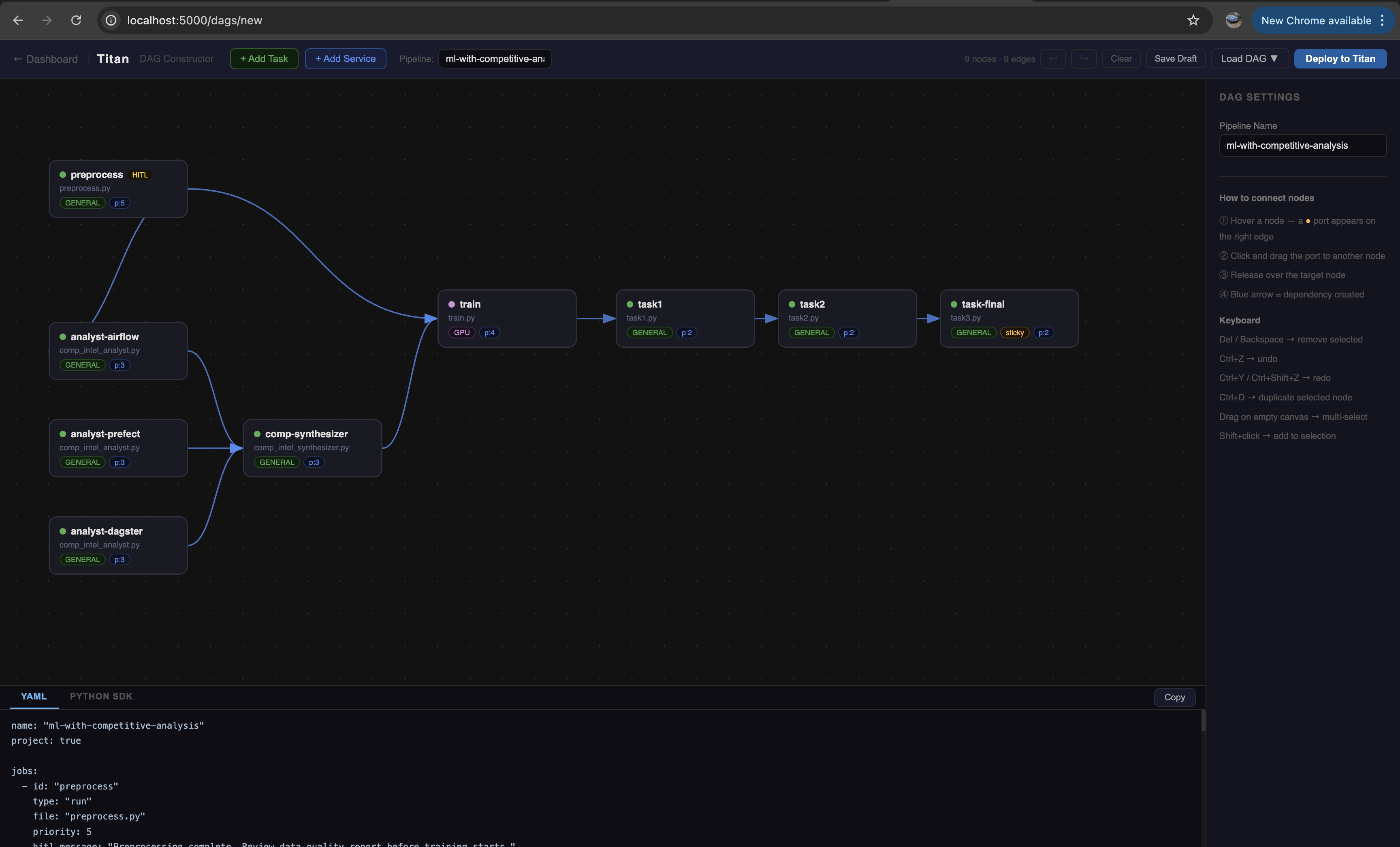
Layout
┌─────────────────────────────────────────────────────┬──────────┐
│  Topbar — pipeline name, actions, deploy            │          │
├────────────────────────────────────────────────────┤ Sidebar  │
│                                                    │          │
│  Canvas — drag nodes, draw edges                  │  Node    │
│                                                    │  Config  │
│                                                    │          │
├────────────────────────────────────────────────────┤          │
│  Output panel — live YAML / Python SDK preview    │          │
└────────────────────────────────────────────────────┴──────────┘
Topbar — add nodes, name the pipeline, undo/redo, save draft, load a previous DAG, deploy.
Canvas — the work area. Nodes are draggable. Edges are drawn by dragging from a node's output port to another node.
Sidebar — appears when a node is selected. Configure all job properties: script, capability, args, HITL gate, and more.
Output panel — live YAML and Python SDK codegen that updates as you build. Copyable with one click.
Quick start
- Click + Add Task in the topbar to place a node on the canvas
- Select the node — the sidebar opens
- Set a Job ID and choose a Script File from the dropdown
- Hover the node — a port (●) appears on its right edge
- Drag from the port to another node to create a dependency edge
- Click Deploy to Titan when ready
After a successful deploy, the button becomes a "✓ Deployed — View DAG →" link that opens the DAG Visualizer for the run.
Node types
| Type | Use for |
|---|---|
| Task (Run Payload) | Scripts that run once and exit — training, preprocessing, analysis |
| Service | Long-running processes that stay alive — model servers, API endpoints |
Capability routing
Each node has a Requirement field that controls which worker receives the job:
| Requirement | Worker needed |
|---|---|
GENERAL |
Any available worker |
GPU |
Worker started with GPU capability |
HIGH_MEM |
Worker started with HIGH_MEM capability |
Workers advertise their capability at startup. The master only dispatches a job to a worker that matches its requirement.
Next steps
- Building DAGs — full node configuration reference
- HITL Gates — adding human approval steps
- Managing DAGs — save drafts, load for editing, redeploy
- Keyboard Shortcuts