Workspace Files
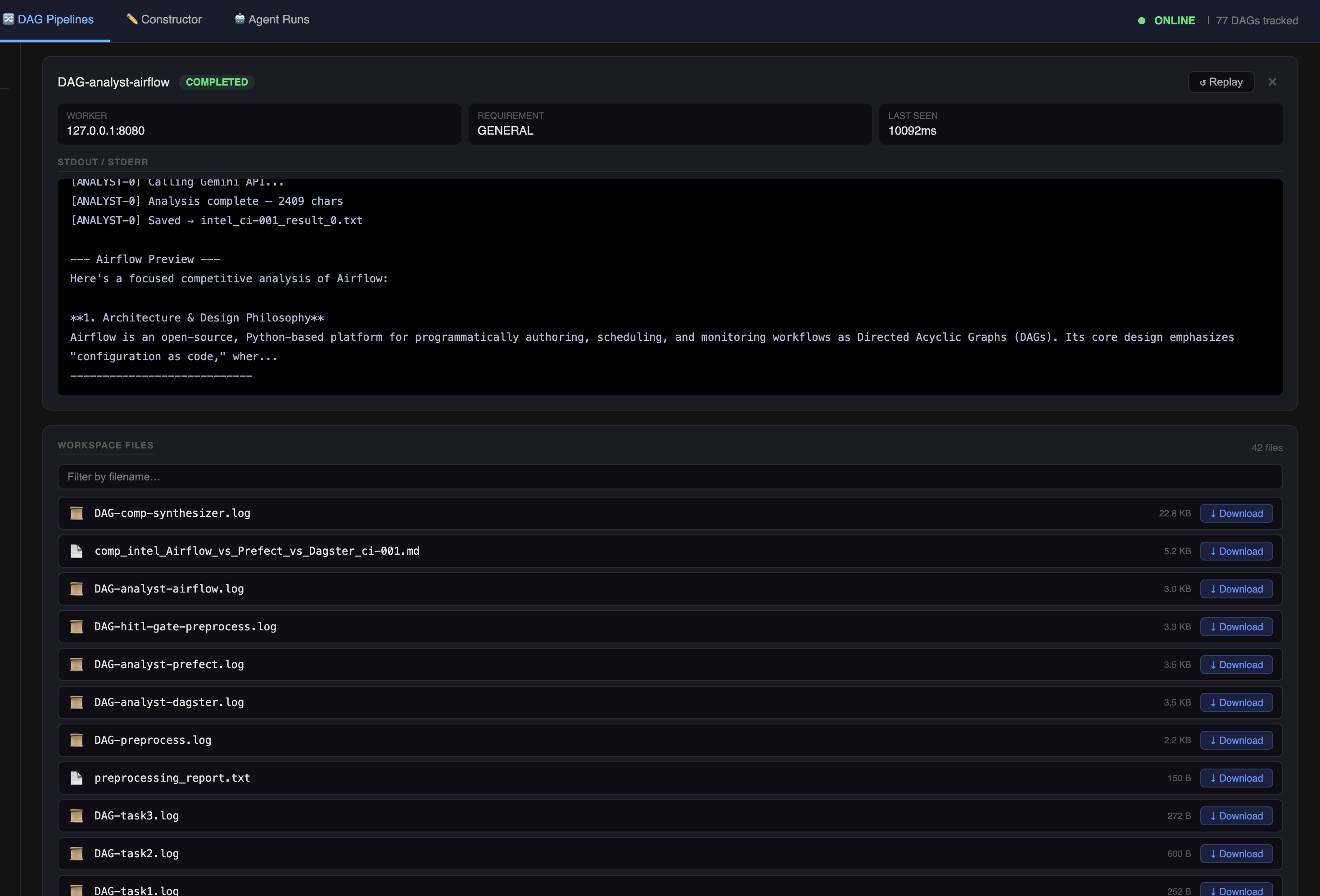
The Workspace Files panel shows output files generated by jobs in the current DAG run. Files are listed with size, last-modified timestamp, and a direct download link.
Where files come from
Local workers (same machine as Master)
Worker scripts write output to titan_workspace/shared/ — a directory on the same host as the Master. Any file written there is immediately visible in the files panel.
# In a worker script (local worker)
import os

output_path = os.path.join(
    os.path.dirname(__file__), '..', 'titan_workspace', 'shared',
    'my_output.txt'
)
with open(output_path, 'w') as f:
    f.write(results)
Standard log files (DAG-<job-id>.log) are written automatically by the Master for every job that runs on a local worker.
Remote workers (SSH tunnel, RunPod, GCP, etc.)
Remote workers must explicitly upload files
Remote workers run on a different machine — they have no access to the Master's filesystem. Files written to the worker's local disk never appear in the Workspace Files panel unless the job script explicitly uploads them using the SDK.
This includes log files: DAG-<job-id>.log is not auto-generated for remote workers. Use the STDOUT/STDERR panel in the Visualizer to read live output from remote jobs.
To make a file downloadable from a remote worker, call upload_file at the end of your job script:
Filtering
The panel filters files by the job names in the current DAG. It uses token expansion — job names are split on - and each token is matched independently against filenames.
For example, a job named analyst-airflow matches files containing analyst or airflow:
DAG-analyst-airflow.log✓ (matches "analyst-airflow")comp_intel_Airflow_vs_Prefect_vs_Dagster_ci-001.md✓ (matches "airflow")intel_ci-001_result_0.txt✓ (matches "intel")
Tokens shorter than 3 characters are ignored to avoid false matches.
Downloading files
Each file entry has a download link. Click it to download the file directly from the server.
Files are served from /api/workspace/file/<filename>.
Expected files per job type
| Job | Expected outputs |
|---|---|
| Any job | DAG-<job-id>.log — full stdout/stderr |
| Preprocessing | Domain-specific report file (e.g. preprocessing_report.txt) |
| LLM analyst jobs | Raw output text per analyst (e.g. intel_ci-001_result_0.txt) |
| Synthesizer jobs | Final synthesized report (e.g. comp_intel_Airflow_vs_Prefect_vs_Dagster_ci-001.md) |
| Training jobs | Model artifacts, metrics files |
Using files for HITL decisions
The files panel is designed to work alongside the HITL approval flow. Download and review a job's output before approving or rejecting the gate that follows it.
File persistence
Files in titan_workspace/shared/ persist across DAG runs. They are not automatically cleaned up. If you run the same pipeline multiple times, output files are overwritten if the worker uses the same filename, or accumulate if filenames include run IDs or timestamps.